Customer Effort Score Survey Template
A Customer Effort Score (CES) survey helps you understand how much effort customers need to complete a task — like finding information, resolving an issue, or placing an order. It’s a simple way to spot friction in key moments of the customer journey and prioritize improvements that make experiences smoother for your customers.
What you get with the AidaForm CES survey example:
Industry-standard question and scale – This survey includes a standard Customer Effort Score (CES) question with a 5-point scale, usable for any company and situation.
Actionable insights with smart follow-ups – Optional questions appear only when relevant, keeping the survey short while still capturing the “why” behind the score.
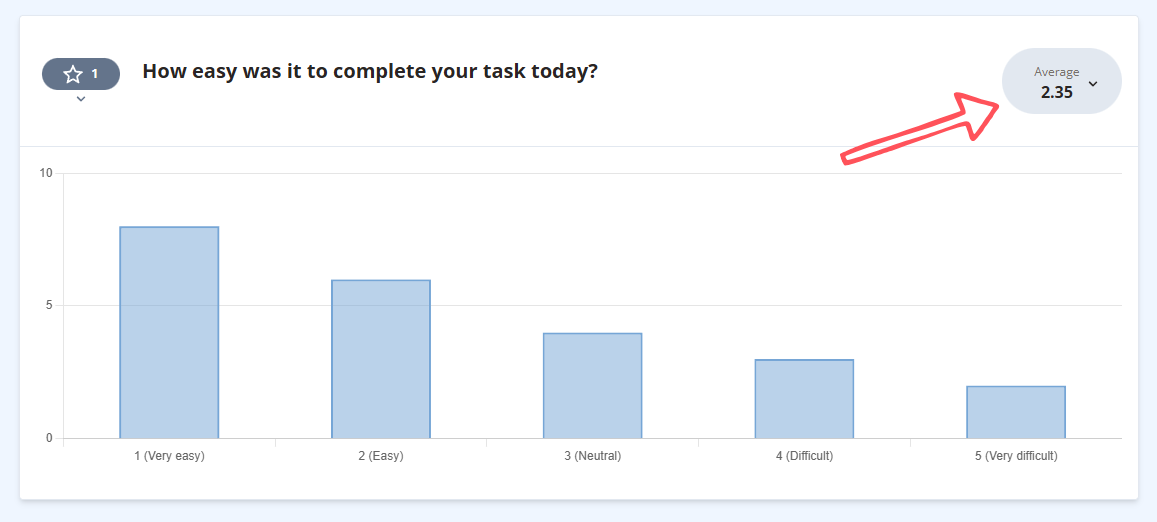
Clear results and automatic CES calculation – In the Results section, you’ll see an easy-to-scan chart for your main question, plus your Customer Effort Score calculated automatically.
Customize this template in AidaForm with our drag-and-drop builder: edit questions, add your logo, and apply brand colors in minutes.
Below on this page:
FAQs about Customer Effort Score survey 3 steps to start your survey with AidaForm More templates to measure customer satisfaction
FAQs about Customer Effort Score survey
What is the Customer Effort Score?
Customer Effort Score (CES) is a customer experience metric that shows how much effort someone had to put in to complete a task — for example, getting help, finding information, placing an order, or using a feature. The lower the effort, the smoother the experience tends to feel, and the more likely customers are to come back.
What is the Customer Effort Score question?
The standard CES question is a simple “ease” question customers can answer in a few seconds. A common version is:
“How easy was it to complete your task today?”
You can also tailor it to a specific touchpoint while keeping the same structure, for example:
- Support: “How easy was it to get the help you needed today?”
- Checkout: “How easy was it to place your order today?”
- Onboarding: “How easy was it to get started today?”
- Self-service: “How easy was it to find the information you needed?”
Tip: Keep the wording neutral and specific to the moment you’re asking about.
How do you measure and calculate the Customer Effort Score?
Customers rate their experience on a scale (often 1–5 or 1–7, from Very easy to Very difficult). To calculate CES, take the average of all responses for a given question and time period. If you add an optional comment field, you’ll also learn why customers chose that score — which makes the results much easier to act on.
What is a good Customer Effort Score?
A good CES is typically a low score — for example, under 3 on a 1–5 scale where 1 = Very easy and 5 = Very difficult — showing that customers found the process easy. What counts as “good” depends on your industry, audience, and the task you’re measuring, so the best benchmark is your trend over time. If you’d like, you can also track CES by journey step (e.g., onboarding vs. support) to see where improvements will have the biggest impact.
How often should you use a Customer Effort Score survey?
CES works best when it’s event-based — sent right after key interactions such as a support resolution, purchase, onboarding step, or feature completion. This timing keeps feedback accurate and actionable without overwhelming customers. Start with the moments that matter most, then expand as you learn what drives effort in your experience.
Start your CES survey with AidaForm in 3 steps
Add the template to your account
Click the Use This Template button — we’ll copy the CES survey template into your AidaForm workspace.
If you see the sign-up page, it means you don’t have an account yet. Complete the quick registration, confirm your email, and log in — the template will appear in your list of forms.
Customize questions and design (optional)
In the form builder, you can edit the wording to match your tone and adjust the questions if needed. To add extra fields, open the Form Elements panel on the left and drag in what you need.
You can also add your logo and style everything in the Form Designer — colors, fonts, buttons — so the survey feels like a natural part of your customer experience.
Publish and share it where it fits best
Open the Publish tab and switch the form status to live. Then share it at the right moment — after support chats, onboarding steps, or key actions. Use a direct link (email, QR code, social media) or embed it on your website.
See your CES results at a glance
As responses come in, open the Results section to view a simple chart for your main CES question, with your Customer Effort Score calculated automatically.